Cloudflare4 min read
My Experience Installing Cloudflare 1.1.1.1 and WARP on iPad
I've always cared about having a fast and private internet connection, especially when using public Wi-Fi or mobile networks. That's why I decided to try Cloudflare's 1.1.1.1 app with WARP. Below I'll share how the setup looks on iOS, what each option means, and why I personally keep it installed.
1. What Is WARP?
When the internet was created, no one imagined phones, tablets or laptops constantly online. That’s why the browsing model still feels old, slow and insecure.
Cloudflare created WARP to fix that:
- It encrypts traffic from your device
- It replaces outdated protocols with something modern and safer
👉 For me, this means peace of mind when connecting to a café’s Wi-Fi.
2. Installing the VPN Profile
When you first open the app, it asks to install a VPN profile.
This step is necessary so that the app can encrypt and route all your internet traffic.
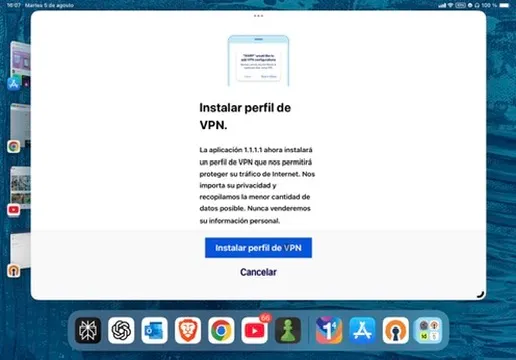
iOS then asks for confirmation:
👉 At first, I hesitated (“Do I really want another VPN profile?”), but Cloudflare clearly states they collect the minimum possible data and never sell it. That convinced me.
3. Activating WARP
Once installed, the app shows a big switch.
- Off → “Your connection is not private.”
- On → WARP protects your traffic.
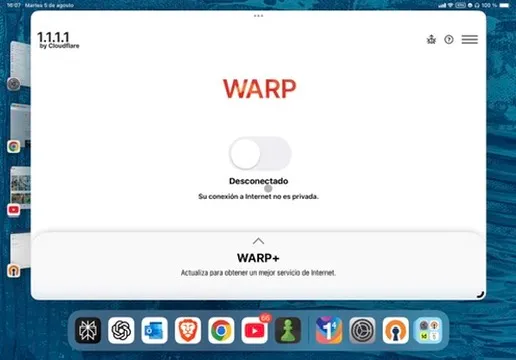
👉 This is what I love: one tap, and I know my browsing is safer.
4. Options in the App
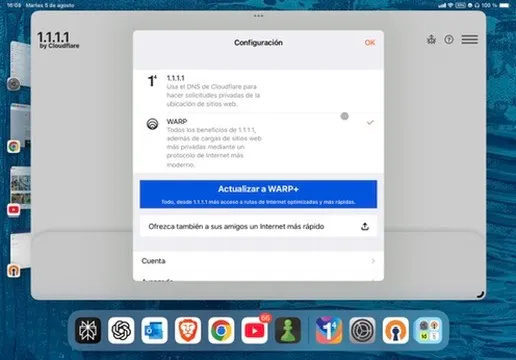
Inside Settings, you can choose between:
- 1.1.1.1 only – Use Cloudflare’s DNS for faster, private lookups
- WARP – Encrypt all traffic between your device and Cloudflare
- WARP+ – Same as WARP, but even faster thanks to Cloudflare’s Argo network
5. Comparison of Options
| Feature | 1.1.1.1 (DNS only) | 1.1.1.1 for Families | WARP | WARP+ |
|---|---|---|---|---|
| Encrypts DNS | ✅ Yes | ✅ Yes | ✅ Yes | ✅ Yes |
| Encrypts all traffic | ❌ No | ❌ No | ✅ Yes | ✅ Yes |
| Privacy-friendly logging | ✅ Logs purged in 24h | ✅ Logs purged in 24h | ✅ Minimal | ✅ Minimal |
| Malware/adult blocking | ❌ No | ✅ Yes | ❌ No | ❌ No |
| Speed optimisation | ✅ Fast lookups | ✅ Fast lookups | ✅ Optimised routing | 🚀 Argo backbone |
| Good for… | Everyday private DNS | Families/children | Safer browsing anywhere | Best speed + security |
👉 Personally, I started with plain 1.1.1.1. But on mobile, WARP makes more sense because it secures everything, not just DNS.
6. Why I Keep It Installed
🔒 Security on public Wi-Fi
I don’t worry if I’m in an airport or a hotel.
⚡ Better speed
Even with the free version, pages often load faster.
👨👩👧 Option for families
If I ever set up a device for kids, I can switch to 1.1.1.1 Families.
🧘 Simplicity
Unlike traditional VPNs, there’s no complex setup. Just a switch.
Key Benefits I’ve Experienced
- Reduced latency - Websites load noticeably faster
- Peace of mind - No more worrying about public Wi-Fi security
- Battery efficiency - Unlike heavy VPN apps, this barely affects battery life
- Reliability - Rarely disconnects or causes connection issues
- Transparency - Cloudflare’s privacy policy is clear and trustworthy
Technical Details
How WARP Works
- Creates an encrypted tunnel from your device to Cloudflare’s network
- Routes traffic through Cloudflare’s global network for optimisation
- Uses modern protocols like WireGuard for efficiency
- Maintains connection even when switching between Wi-Fi and cellular
Privacy Considerations
- Cloudflare doesn’t log browsing activity
- DNS queries are purged within 24 hours
- No personal information is sold to third parties
- Open source components allow for community auditing
Performance Impact
In my testing on iPad:
- Minimal battery drain - Less than 2% additional usage per day
- Faster DNS resolution - 20-30ms improvement on average
- Better streaming - More consistent video quality on mobile networks
- Gaming performance - No noticeable impact on online games
Final Thoughts
If you want a practical way to make your browsing faster and safer, Cloudflare’s 1.1.1.1 + WARP is worth trying.
For me, it’s become a default app on my devices: lightweight, trustworthy, and effective without overcomplicating things.
👉 One tap and I know my connection is private.
Should You Try It?
Yes, if you:
- Use public Wi-Fi regularly
- Want better privacy without complexity
- Experience slow DNS resolution
- Value transparency in privacy tools
Maybe not if you:
- Already use a comprehensive VPN solution
- Have very limited data plans (though WARP is quite efficient)
- Need specific geographic IP locations
The free tier is generous enough for most users, and the setup process is genuinely straightforward. Give it a try - you can always disable it if it doesn’t meet your needs.
Have you tried Cloudflare WARP? Share your experience in the comments or reach out through my public inbox!